

本文提到的所有数值,key,客户端ID,URL等均为示例值,请以实际为准。部分数值已做脱敏处理,仅用于说明。
链路结构
增量包配信链路由三段组成,各段承载不同协议角色:
┌──────────────────────────────────────────────┐│ 第一段 instruction 请求 ││ POST http://at.sys-allnet.cn/net/delivery/ ││ instruction ││ 请求体:AES-128-CBC 密文 ││ 响应体:IV(明文) + AES-128-CBC 密文 ││ 解密结果:经过混淆处理的 order 索引地址 │├──────────────────────────────────────────────┤│ 第二段 order 索引文件 ││ 明文 GET,User-Agent 取值为 client_id ││ 内容:INSTALLn= 数据文件地址(.app/.opt) │├──────────────────────────────────────────────┤│ 第三段 增量包本体 ││ 明文 GET(服务器支持 Range 请求),UA 同上 ││ 载荷无应用层加密、无完整性校验 │└──────────────────────────────────────────────┘链路中使用的协议标识如下:
| 标识 | 出现位置 | 含义 |
|---|---|---|
SDGB | title_id、User-Agent | 机台在 ALL.NET 体系内的 title 代号 |
A63E******* | client_id、下载通道 UA | 机台标识符 User-Agent |
DFI | Pragma 头 | 配信指令业务标记(全称未确认) |
| order | 第二段 | 资源索引文件,纯文本格式 |
INSTALLn | order 内容 | 单条资源地址记录 |
传输层为纯 HTTP,无 TLS。密码学保护仅存在于第一段控制信道,第二、三段为明文传输。
instruction 请求构造
明文载荷
请求明文为表单编码字符串,共三个字段:
title_id=SDGB&title_ver=1.50.00&client_id=A63E*******title_id:固定值SDGB;title_ver:版本字符串,服务端根据该值返回对应版本的资源索引地址,协议层面为不透明字符串,格式约束由服务端实现决定;client_id:11 字符机台标识,除参与表单外,还以同一取值充当后续数据通道的 User-Agent。
请求中不包含签名、HMAC、时间戳或防重放字段,服务端可验证的身份信息仅为 client_id 明文。
加密参数
加密算法为 AES-128-CBC(密钥 16 字节),填充方式为 PKCS#7。密钥为硬编码常量:
2f 3f 6a 6f 2b 22 4c 26 5c 43 72 39 28 3d 6b 47CBC 初始向量为 16 字节全零。加密前,明文头部需附加 16 字节全零作为保留槽位:
KEY = bytes([47, 63, 106, 111, 43, 34, 76, 38, 92, 67, 114, 57, 40, 61, 107, 71])content = b'title_id=SDGB&title_ver=1.50.00&client_id=A63E*******'payload = bytes(16) + content # 头部附加 16 字节零cipher = AES.new(KEY, AES.MODE_CBC, bytes(16))body = cipher.encrypt(pad(payload, 16)) # PKCS#7 填充该槽位与协议双向使用的 IV || 数据 帧抽象相关,请求侧与响应侧的处理方式不同,见响应解密部分。
报文格式
请求方法为 POST,端点为 http://at.sys-allnet.cn/net/delivery/instruction。请求体为加密后的原始字节序列,不做表单编码,未设置 Content-Type。请求头仅需两个字段:
User-Agent: SDGB;Windows/LitePragma: DFICBC 首块恒定性
由于初始向量恒为零、明文首 16 字节槽位亦恒为零,第一个密文块为仅依赖密钥的常量:
C0 = Enc(K, 0^16 ⊕ 0^16) = Enc(K, 0^16)该常量可预计算,且对所有请求报文相同。该特性不泄露明文内容,但构成固定流量特征,可用于传输层流量识别。
响应解密与解析
帧格式
响应状态码为 200 时,响应体为二进制数据,总长度不小于 16 字节,结构分为两部分:
- 前 16 字节:初始向量,明文传输;
- 其余部分:AES-128-CBC 密文。
解密使用与请求相同的静态密钥,初始向量取自响应体前 16 字节:
iv = resp.content[:16]plain = unpad(AES.new(KEY, AES.MODE_CBC, iv).decrypt(resp.content[16:]), 16)text = unquote(plain.decode('utf-8'), 'utf-8')响应体长度小于 16 字节或 PKCS#7 填充校验失败时,视为无效响应。非 200 状态码表示请求被拒绝。
两个方向的帧处理方式差异如下:
| 方向 | 16 字节槽位处理 | IV 来源 |
|---|---|---|
| 请求 | 纳入明文一并加密(取值为全零) | 配置值:全零 |
| 响应 | 以明文形式置于帧头 | 服务端生成,随响应传输 |
即请求侧与响应侧遵循相同的 IV || 数据 帧抽象,但实现不对称。
明文格式
解密结果为经过百分号编码的查询字符串。处理顺序为:先整体 unquote,再按表单键值对解析。parse_qs 内部会再次执行百分号解码,编码实际被解码两次;因内容中不含残余百分号序列,第二次解码无副作用。
uri=tps%3A%2F%2Fnaomi_xxx%2F...%7Ctps%3A%2F%2F...协议中实际使用的字段仅有 uri。解码后结构如下(地址内容为示意,字段结构为实际观测值):
uri=tps://naomi_xxx/xxx/option_1_50/SDGB_option_1_50_0_info|tps://...uri 字段内以 | 分隔多条候选地址,指向同一份 order 索引的不同节点,任取一条可用地址即可。候选列表中可能存在字面量 null 条目,解析时需过滤。
URL 混淆还原
混淆方式
uri 字段中的地址经过四层变换:
| 层 | 变换 | 示例 |
|---|---|---|
| 1 | scheme 前缀残缺 | tps:// / ps:// / ttp://,缺失 “ht” 字符 |
| 2 | 主机名点号替换为下划线 | naomi_sys_1 |
| 3 | 路径中版本号点号替换为下划线 | option_1_50 实为 option_1.50 |
| 4 | 扩展名点号替换为下划线 | 结尾 _info 实为 .info |
第一层变换使匹配 https?:// 模式的常规地址提取正则失效,混淆目标是阻止未实现协议解析的脚本直接获取索引地址。
由路径结构可确认资源分为 option 与 patch 两类,版本号以两段数字形式出现在路径中。
还原规则
按层逆变换:
url = re.sub(r'^tps://', 'https://', url)url = re.sub(r'^ps://', 'https://', url)url = re.sub(r'^ttp://', 'http://', url)
host = hostname.replace('_', '.')
path = re.sub(r'(patch|option)_(\d+)_(\d+)', r'\1_\2.\3', path) # option_1_50 → option_1.50path = re.sub(r'_([a-zA-Z0-9]+)$', r'.\1', path) # 结尾 _info → .info主机名含端口时需在重建 netloc 时保留端口号。还原后地址形如:
https://naomi.xxx/xxx/option_1.50/SDGB_option_1.50_0.info该混淆仅作用于 instruction 响应中给出的索引地址;order 文件内部的资源地址为完整有效 URL,不经混淆处理。
order 索引文件
拉取
使用 GET 请求获取还原后的索引地址,User-Agent 设置为 client_id 取值(A63E*******)。数据通道不使用 Cookie、Token 等凭据,访问控制仅依赖 User-Agent 匹配。
记录格式
order 文件为纯文本,每行一条记录:
INSTALL1=https://xxx/.../SDGB_option_xxx.appINSTALL2=https://xxx/.../SDGB_option_yyy.opt提取正则:
pattern = r'INSTALL\d+=\s*(https?://\S+)'提取结果按文件名(URL 最后一段路径)做自然排序,即数值感知排序,使 1、2、…、10、11 的顺序不受字典序影响。INSTALL 记录的序号对应官方定义的资源安装顺序,排序操作即按序号还原原始次序。
增量包传输
获取资源地址后的传输流程:
- HEAD 请求读取
Content-Length响应头,获取文件总大小; - 服务器支持 HTTP Range 请求,可通过
Range: bytes=start-end头部实现分段传输; - User-Agent 保持为
client_id取值; - 载荷即最终文件数据,无应用层加密,无校验字段,落盘数据即为最终内容。
整条链路中唯一的密码学操作发生在 instruction 请求与响应的单次往返内;数据通道的完整性与机密性均依赖传输层机制,而传输层为明文 HTTP。
Python示例
import osimport reimport sysimport timeimport requestsimport threadingimport webbrowserfrom urllib.parse import parse_qs, unquote, urlparse, urlunparsefrom concurrent.futures import ThreadPoolExecutor, as_completedfrom Crypto.Cipher import AESfrom Crypto.Util.Padding import pad, unpadfrom flask import Flask, render_template_string, request, jsonify, send_from_directory
app = Flask(__name__)
# h2和id换成自己的,一般填同一个S = { "v": "1.56", "k": bytes([47, 63, 106, 111, 43, 34, 76, 38, 92, 67, 114, 57, 40, 61, 107, 71]), "iv": bytes(16), "url": "http://at.sys-allnet.cn/net/delivery/instruction", "h1": "SDGB;Windows/Lite", "h2": "A63E*******", "id": "A63E*******",}
W = os.path.dirname(os.path.abspath(__file__))
state = { "files": [], "urls": [], "downloading": False, "progress": {}, "selected": [], "current": "", "title_ver": "1.56"}
def aes_crypt(key, iv, data, enc=True): c = AES.new(key, AES.MODE_CBC, iv) if enc: return c.encrypt(pad(data, 16)) return unpad(c.decrypt(data), 16)
def fix_url(u): u = re.sub(r'^tps://|^ps://', 'https://', re.sub(r'^ttp://', 'http://', u)) p = urlparse(u) if p.hostname: h = p.hostname.replace('_', '.') pa = re.sub(r'(patch|option)_(\d+)_(\d+)', r'\1_\2.\3', p.path) pa = re.sub(r'_([a-zA-Z0-9]+)$', r'.\1', pa) return urlunparse((p.scheme, h + (f":{p.port}" if p.port else ""), pa, p.params, p.query, p.fragment)) return u
def get_main(): content = f'title_id=SDGB&title_ver={state["title_ver"]}&client_id={S["id"]}'.encode() payload = bytes(16) + content encrypted = aes_crypt(S["k"], S["iv"], payload, True) r = requests.post(S["url"], data=encrypted, headers={"User-Agent": S["h1"], "Pragma": "DFI"}, timeout=30) r.raise_for_status() if len(r.content) < 16: raise RuntimeError("Response too short") decrypted = aes_crypt(S["k"], r.content[:16], r.content[16:], False) raw = unquote(decrypted.decode('utf-8')) q = parse_qs(raw) items = [x.strip() for x in q.get('uri', [''])[0].split('|') if x.strip() and x.strip().lower() != 'null'] items = [fix_url(x) for x in items] if not items: raise RuntimeError("No URLs") return items[0]
def sess(): s = requests.Session() s.headers.update({"User-Agent": S["h2"]}) return s
def fetch(url, name): tmp = os.path.join(W, name + ".tmp") s = sess() try: r = s.head(url, timeout=30) r.raise_for_status() total = int(r.headers.get('Content-Length', 0)) except: total = 0 if not total: r = s.get(url, stream=True, timeout=(10, 120)) r.raise_for_status() with open(tmp, 'wb') as f: for chunk in r.iter_content(262144): if chunk: f.write(chunk) os.replace(tmp, os.path.join(W, name)) return True with open(tmp, 'wb') as f: f.truncate(total) cs = 2 * 1024 * 1024 cnt = min(4, (total + cs - 1) // cs) csz = (total + cnt - 1) // cnt chunks = [(i * csz, min((i + 1) * csz - 1, total - 1)) for i in range((total + csz - 1) // csz)]
def worker(st, ed): for _ in range(3): try: r2 = s.get(url, headers={"Range": f"bytes={st}-{ed}"}, stream=True, timeout=(10, 120)) r2.raise_for_status() with open(tmp, 'r+b') as f: f.seek(st) for chunk in r2.iter_content(262144): if chunk: f.write(chunk) return True except: time.sleep(1) return False
with ThreadPoolExecutor(max_workers=len(chunks)) as ex: fs = [ex.submit(worker, st, ed) for st, ed in chunks] for f, (st, ed) in zip(as_completed(fs), chunks): if not f.result(): r2 = s.get(url, headers={"Range": f"bytes={st}-{ed}"}, stream=True, timeout=(10, 120)) r2.raise_for_status() with open(tmp, 'r+b') as f2: f2.seek(st) for chunk in r2.iter_content(262144): if chunk: f2.write(chunk) os.replace(tmp, os.path.join(W, name)) return True
def parse_list(src, local=False): if local: with open(src, 'r', encoding='utf-8') as f: text = f.read() else: text = sess().get(src, timeout=30).text pairs = [] for m in re.findall(r'INSTALL\d+=\s*(https?://\S+)', text): n = m.split('/')[-1] pairs.append((n, m)) pairs.sort(key=lambda x: [int(p) if p.isdigit() else p.lower() for p in re.split(r'(\d+)', x[0])]) return [x[0] for x in pairs], [x[1] for x in pairs]
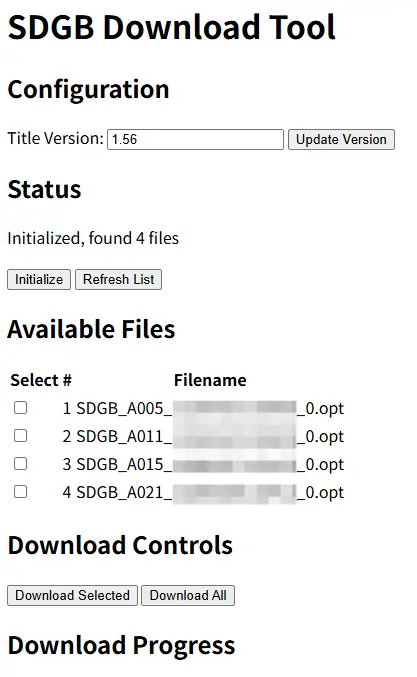
HTML_TEMPLATE = """<!DOCTYPE html><html><head> <meta charset="UTF-8"> <title>SDGB Download Tool</title></head><body> <header> <h1>SDGB Download Tool</h1> </header>
<main> <section id="config"> <h2>Configuration</h2> <div> <label for="titleVer">Title Version:</label> <input type="text" id="titleVer" value="1.56"> <button id="updateVerBtn">Update Version</button> </div> <p id="versionStatus"></p> </section>
<section id="status"> <h2>Status</h2> <p id="statusMessage">Ready</p> <button id="initBtn">Initialize</button> <button id="refreshBtn">Refresh List</button> </section>
<section id="fileList"> <h2>Available Files</h2> <div id="fileContainer"></div> </section>
<section id="controls"> <h2>Download Controls</h2> <button id="downloadSelectedBtn">Download Selected</button> <button id="downloadAllBtn">Download All</button> </section>
<section id="downloadProgress"> <h2>Download Progress</h2> <div id="progressContainer"></div> </section> </main>
<script> let files = []; let urls = [];
function updateStatus(msg) { document.getElementById('statusMessage').textContent = msg; }
function loadFileList() { fetch('/api/files') .then(r => r.json()) .then(data => { files = data.files; urls = data.urls; renderFileList(); }) .catch(err => updateStatus('Error loading files: ' + err)); }
function renderFileList() { const container = document.getElementById('fileContainer'); container.innerHTML = ''; const table = document.createElement('table'); const thead = document.createElement('thead'); thead.innerHTML = '<tr><th>Select</th><th>#</th><th>Filename</th></tr>'; table.appendChild(thead); const tbody = document.createElement('tbody'); files.forEach((name, idx) => { const tr = document.createElement('tr'); const cb = document.createElement('input'); cb.type = 'checkbox'; cb.value = idx; tr.appendChild(document.createElement('td')).appendChild(cb); tr.appendChild(document.createElement('td')).textContent = idx + 1; tr.appendChild(document.createElement('td')).textContent = name; tbody.appendChild(tr); }); table.appendChild(tbody); container.appendChild(table); }
function getSelected() { const cbs = document.querySelectorAll('#fileContainer input[type=checkbox]:checked'); return Array.from(cbs).map(cb => parseInt(cb.value)); }
document.getElementById('updateVerBtn').addEventListener('click', function() { const ver = document.getElementById('titleVer').value.trim(); if (!ver) { document.getElementById('versionStatus').textContent = 'Please enter a version'; return; } fetch('/api/version', { method: 'POST', headers: {'Content-Type': 'application/json'}, body: JSON.stringify({version: ver}) }) .then(r => r.json()) .then(data => { document.getElementById('versionStatus').textContent = data.message; updateStatus('Version updated to ' + ver); }) .catch(err => { document.getElementById('versionStatus').textContent = 'Error: ' + err; }); });
document.getElementById('initBtn').addEventListener('click', function() { updateStatus('Initializing...'); fetch('/api/init') .then(r => r.json()) .then(data => { updateStatus(data.message); loadFileList(); }) .catch(err => updateStatus('Init error: ' + err)); });
document.getElementById('refreshBtn').addEventListener('click', function() { loadFileList(); updateStatus('List refreshed'); });
document.getElementById('downloadSelectedBtn').addEventListener('click', function() { const selected = getSelected(); if (selected.length === 0) { updateStatus('No files selected'); return; } startDownload(selected); });
document.getElementById('downloadAllBtn').addEventListener('click', function() { if (files.length === 0) { updateStatus('No files available'); return; } startDownload(files.map((_, i) => i)); });
function startDownload(idxs) { updateStatus('Downloading...'); fetch('/api/download', { method: 'POST', headers: {'Content-Type': 'application/json'}, body: JSON.stringify({indices: idxs}) }) .then(r => r.json()) .then(data => { updateStatus(data.message); checkProgress(); }) .catch(err => updateStatus('Download error: ' + err)); }
function checkProgress() { fetch('/api/progress') .then(r => r.json()) .then(data => { const container = document.getElementById('progressContainer'); container.innerHTML = ''; if (data.running) { const p = document.createElement('p'); p.textContent = 'Downloading: ' + data.current; container.appendChild(p); setTimeout(checkProgress, 1000); } else { const p = document.createElement('p'); p.textContent = 'Download complete'; container.appendChild(p); updateStatus('Ready'); loadFileList(); } }) .catch(() => setTimeout(checkProgress, 2000)); }
loadFileList(); updateStatus('Ready'); </script></body></html>"""
@app.route('/')def index(): return render_template_string(HTML_TEMPLATE)
@app.route('/api/files')def api_files(): return jsonify({"files": state["files"], "urls": state["urls"]})
@app.route('/api/version', methods=['POST'])def api_version(): data = request.get_json() version = data.get('version', '').strip() if not version: return jsonify({"message": "Invalid version"}), 400 state["title_ver"] = version return jsonify({"message": f"Version set to {version}"})
@app.route('/api/init')def api_init(): try: main_url = get_main() name = main_url.split('/')[-1].split('?')[0] fetch(main_url, name) files, urls = parse_list(os.path.join(W, name), True) state["files"] = files state["urls"] = urls return jsonify({"message": f"Initialized, found {len(files)} files"}) except Exception as e: return jsonify({"message": f"Error: {str(e)}"}), 500
@app.route('/api/download', methods=['POST'])def api_download(): if state["downloading"]: return jsonify({"message": "Download already in progress"}), 400
data = request.get_json() indices = data.get('indices', []) if not indices: return jsonify({"message": "No indices provided"}), 400
def download_worker(): state["downloading"] = True try: for idx in indices: if idx < len(state["urls"]) and idx < len(state["files"]): state["current"] = state["files"][idx] fetch(state["urls"][idx], state["files"][idx]) state["current"] = None finally: state["downloading"] = False
thread = threading.Thread(target=download_worker) thread.daemon = True thread.start()
return jsonify({"message": f"Downloading {len(indices)} files"})
@app.route('/api/progress')def api_progress(): return jsonify({ "running": state["downloading"], "current": state.get("current", "") })
def run(): port = 2580 url = f"http://127.0.0.1:{port}" webbrowser.open(url) app.run(host='127.0.0.1', port=port, debug=False)
if __name__ == "__main__": try: run() except KeyboardInterrupt: print("\nStopped") except Exception as e: print(f"Error: {e}")复制后粘贴为app.py,将h2和id换成自己的,一般填同一个,随后执行
pip install requests pycryptodome flask安装依赖。安装完成后执行
python app.py即可启动,默认web UI地址http://127.0.0.1:2580,可自定义标题版本,默认1.56。可以直接通过web UI操作下载配信文件或增量包。
分享文章
生成精美分享图或复制链接,与更多人分享本文。
继续阅读
换条路线
从其他文章中稳定抽取
最后更新于 ,距今已过 45 天
部分内容可能已过时